
If you already have an account and need assistance accessing it, this guide explains the general login process for RC777 Game. The purpose of this article is to provide clear, factual information to help existing users understand how to sign in, recover a forgotten password, troubleshoot common login issues, and follow basic account security practices.
The exact log in screens and requirements may change over time as the platform updates its application. If you notice differences between this guide and the current version of the app, follow the instructions displayed within the application or refer to the platform’s official support resources.
Before You Log In
Before attempting to sign in, make sure you have the following:
- Your registered username, mobile number, or email address (depending on the platform’s login method).
- Your account password.
- A stable internet connection.
- The latest version of the RC777 Game application, if you are using the mobile app.
- Sufficient battery life on your device to avoid interruptions during the login process.
Having this information ready can help reduce delays and make the login process smoother.
How to Log In to RC777 Game
Follow these general steps to access your account:
Step 1: Open the Application
Launch the RC777 Game application from your device’s home screen or app menu.
Step 2: Select the Login Option
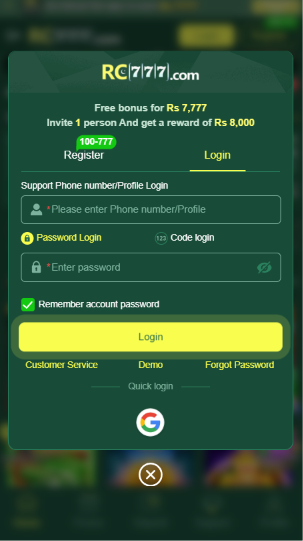
On the main screen, tap the Log in button to open the sign-in page.
Step 3: Enter Your Login Details
Provide the requested information, which may include:
- Mobile number
- Username
- Email address
- Password
Enter your information carefully to avoid typing errors.
Step 4: Submit Your Information
After reviewing your details, tap the Login button.
If the information is correct and your account is active, you should be signed in successfully.
What to Do If You Forget Your Password
If you cannot remember your password, most platforms provide a password recovery feature.
The general process is:
- Select Forgot Password on the login page.
- Enter your registered account information.
- Complete any requested verification process.
- Create a new password.
- Return to the login page and sign in using your updated password.
When creating a new password, choose one that is difficult for others to guess and avoid reusing passwords from other accounts.
Common Login Problems
Sometimes users experience login issues. The following are common problems and possible solutions.
Incorrect Username or Password
Check for typing mistakes.
Make sure:
- Your username or mobile number is correct.
- Your password is entered exactly as created.
- Caps Lock is not affecting password entry if applicable.
Poor Internet Connection
A weak or unstable internet connection may prevent the login request from completing.
Try switching between Wi-Fi and mobile data or reconnecting to your network.
Outdated Application
Older versions of an application may not function correctly.
If an update is available, install the latest version before attempting to log in again.
Server Maintenance
Occasionally, login services may be temporarily unavailable because of maintenance or technical issues.
If this happens, wait for some time before trying again.
Tips for Keeping Your Account Secure
Protecting your account is just as important as remembering your login details.
Consider the following practices:
- Use a strong password containing letters, numbers, and symbols.
- Never share your password with anyone.
- Avoid saving passwords on public or shared devices.
- Log out after using your account on a shared device.
- Change your password if you suspect unauthorized access.
- Keep your device updated with the latest security patches.
Good security habits help reduce the risk of unauthorized access.
Troubleshooting Checklist
If you still cannot access your account, review this checklist:
- Confirm your username or mobile number.
- Verify your password.
- Restart the application.
- Restart your device.
- Check your internet connection.
- Update the application if necessary.
- Try again after a few minutes if the service is temporarily unavailable.
- Contact the platform’s support service if the issue continues.
Frequently Asked Questions
Can I log in on a different device?
In many cases, users can access their account from another compatible device by entering the correct login credentials. Additional verification may be required.
Why am I receiving an incorrect password message?
This usually indicates that the entered password does not match the one associated with your account. Double-check your password or use the password recovery feature if necessary.
Is it safe to save my password?
Saving passwords on a personal device may be convenient, but avoid doing so on public or shared devices.
What should I do if my account appears inaccessible?
Review your login information, ensure you have a stable internet connection, and use the available account recovery options if needed. If the problem persists, contact the platform’s official support.
Conclusion
Logging in to RC777 Game is generally a straightforward process when you have the correct account information and a stable internet connection. Keeping your application updated, protecting your login credentials, and using the password recovery option when necessary can help resolve many common login issues. If you continue to experience problems accessing your account, consult the platform’s official support resources for further assistance.